
In order to run a trace against SQL Server you must be a member of sysadmin fixed server role or have the ALTER TRACE permission
You are trying to run SQL Server Profiler and you got the following error:
In order to run a trace against SQL Server you must be a member of sysadmin fixed server role or have the ALTER TRACE permission.

How to grant a member of sysadmin fixed server role?
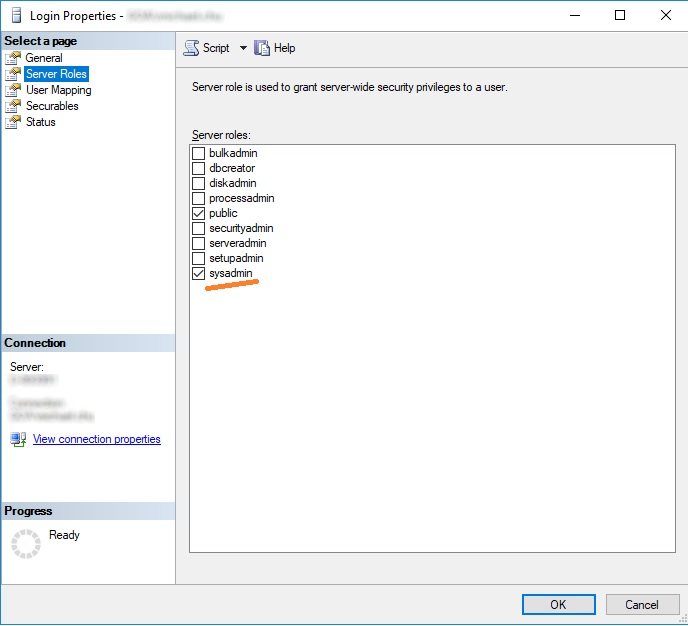
Go to SQL Server Management Studio. Open the instance. There should be a node for Security and then Logins. Note: The Security folder is not the one under database, it is the one directly under the SQL Server instance. Right click the specific login and choose Properties. As shown below, go to Server Roles and grant the sysadmin fixed server role.
How to grant the ALTER TRACE permission?
Go to SQL Server Management Studio. Open the instance. There should be a node for Security and then Logins. Right click the specific login and choose Properties. As shown below, go to Securables and grant the Alter trace permission.
)
Alternative solution - backup database to local environment
Note that the both solutions above give the user a very powerful permission. In my case, I am not able to get access to those features on the servers in my work environment due to strict policies. I use SQL Server Profiler to debug sql code. So I can have the database backup by operations team and then put it in my local environment. Then since I am administrator it automatically inherits sysadmin role. Then I can run SQL Profiler.
|
|
||||
| Copyright © Echofavor 2021. All Rights Reserved. | Powered by Echofavor |
